
Listen to 163 Cloud Music in Your Browser
Overview
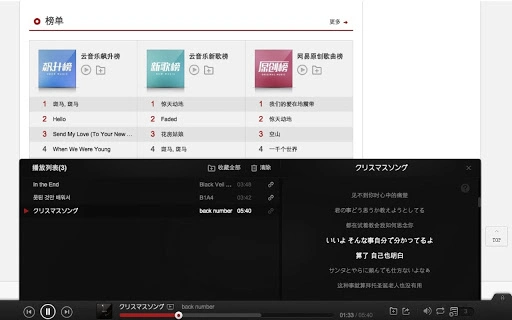
The 163 Cloud Music Browser Extension enables users to access and enjoy music from music.163.com directly within their web browser. Designed for seamless integration, it enhances the listening experience by allowing users to play tracks without navigating away from their current page. This tool is particularly useful for individuals who frequently browse the 163 Cloud Music platform and want a more streamlined way to manage playback.
Target users include casual listeners, music enthusiasts, and anyone who relies on the 163 Cloud Music service for daily entertainment. The extension is ideal for users who value convenience and efficiency when accessing online music content. It is not intended for advanced audio editing or offline playback, as its core function focuses on browser-based music streaming.
As a browser extension, it operates within the user’s preferred web environment, minimizing the need for additional software. The developer did not provide additional details about the development background or company. Platform compatibility information is limited to Windows and Mac, with no further specifications on system requirements or performance expectations.
Key Features & Capabilities
- Direct Music Playback – Allows users to play songs from music.163.com without leaving the current webpage, improving workflow continuity.
- Browser Integration – Seamlessly embeds playback controls into the browser interface, providing quick access to play, pause, skip, and adjust volume.
- Lightweight Design – With a file size of 2.1 MB, the extension is optimized for minimal impact on browser performance and memory usage.
- Platform Support – Compatible with both Windows and Mac operating systems, ensuring broad accessibility across desktop environments.
- Real-Time Updates – Automatically syncs with the 163 Cloud Music website to reflect the latest playlist and track availability.
Users can benefit from a more efficient browsing experience by using this tool to manage music playback while researching, reading, or multitasking. For example, a user can listen to a playlist while reading news articles or studying, without the need to open a separate application or tab.
User Interface, Workflow & Performance
The user interface is designed to be minimal and unobtrusive, integrating playback controls directly into the browser’s toolbar or context menu. Navigation is straightforward, with intuitive icons for common actions such as play, pause, and skip. The workflow is optimized for quick access, allowing users to start or stop music with a single click.
Performance details were not specified by the developer. General software behavior patterns suggest that the extension operates efficiently within modern browsers. The developer did not specify resource usage details, so exact CPU or RAM impact cannot be confirmed. Stability is expected to align with standard browser extension standards, though real-world behavior may vary based on browser configuration and system load.
Compatibility & System Requirements
The extension is compatible with Windows and Mac operating systems. It supports the latest versions of major browsers, though specific browser names were not listed. The installation size is 2.1 MB, which is considered small and suitable for most desktop environments.
Exact system requirements were not listed. The developer did not provide information on minimum processor speed, RAM, or storage needs. Compatibility information is limited to the operating systems mentioned. Users are advised to ensure their system meets general browser requirements for optimal performance.
Pros and Cons
Pros
- Free to download and use with no hidden costs
- Lightweight at only 2.1 MB
- Designed for seamless integration with music.163.com
- Supports both Windows and Mac platforms
- Enables uninterrupted music playback during browsing
Cons
- Only works with the 163 Cloud Music website
- No offline playback functionality
- Developer did not provide detailed system requirements
- Performance behavior not verified under real-world conditions
- Limited to browser-based use; no standalone application
FAQ Section
Is this extension compatible with all web browsers?
Compatibility with specific browsers was not specified. It is designed to work with major browsers, but users should verify support based on their browser type and version.
Can I use this extension offline?
No, the extension requires an active internet connection to stream music from music.163.com. It does not support offline playback.
Is the extension safe to install?
The extension is available for free and does not appear to include known malware. As with any browser extension, users should only install it from trusted sources.
How often does the extension update?
Update frequency was not disclosed. Users should check the extension’s listing for the latest version and release notes.
What kind of license does this extension use?
The licensing model was not provided. Since the software is free, it may be distributed under a permissive or open-source license, but this is not confirmed.
Final Thoughts
This browser extension offers a practical solution for users who regularly access 163 Cloud Music through their web browser. Its lightweight design and seamless integration make it a convenient tool for enhancing the listening experience without switching between applications. While it lacks advanced features like offline playback or cross-platform synchronization, its core purpose is fulfilled effectively.
It is best suited for casual listeners and regular users of the 163 Cloud Music service who prioritize ease of access and minimal system impact. The free pricing model and broad OS support further enhance its appeal. For those who value simplicity and direct access to online music, this extension delivers a reliable and efficient experience.
Download 163 Cloud Music Player Extension now.







